Before we explain BGP, we will start with the Autonomous System and Dynamic Routing Protocol. Then, it will be easy to understand the concept of BGP.
What is an Autonomous System?
An Autonomous System (AS) is a collection of network devices, such as routers, managed by a single organization. Its main role is to control the flow of data within its network and how it connects to other networks on the internet.
When multiple routers in the same local area (like inside a company) are connected, they share data with each other. Once this data is shared and the routers work together, they form a group. This group is what we call an Autonomous System.
Example:
Imagine a company in New York that has several networks to manage. To handle these networks, they install multiple routers. These routers communicate with each other and share data, helping the networks function together. As a result, all the routers form a single group, and this group is called an Autonomous System. It helps the company manage access between different networks, ensuring smooth communication within the organization.
In simple terms, when we manage routing inside a network, we call it an internal routing protocol or single routing domain. However, technically, this setup is known as an autonomous system (AS).

What is the Dynamic Routing Protocol?
A Dynamic Routing Protocol is a method used by routers to automatically find the best path for data to travel across a network. It helps routers adjust routes when the network changes, without needing someone to set them manually.
There are 2 types of Dynamic Routing Protocols,
- IGP (Interior Gateway Protocols)
- EGP (Exterior Gateway Protocols)
IGP (Interior Gateway Protocols)
When multiple routers are part of the same local domain or internal network, they use a special kind of protocol called Interior Gateway Protocol (IGP) to communicate. This allows them to share information and direct traffic efficiently within the network. An internal network like this is also known as a single autonomous system (AS).
IGP helps the routers find the best paths for data within the network, ensuring smooth traffic flow.
There are two main types of IGPs:
- Distance Vector Routing Protocols: These protocols determine the best path for data based on the distance to the destination. They send information about the entire network to neighbouring routers. The types of Distance Vector Routing Protocols include:
| RIP (Routing Information Protocol): | A simple protocol that uses hop count to find the best path. |
|---|---|
| RIP v2: | An updated version of RIP that supports more features like subnetting. |
| IGRP (Interior Gateway Routing Protocol): | A Cisco protocol designed to be more efficient than RIP(Not used Much). |
| EIGRP (Enhanced Interior Gateway Routing Protocol): | Another Cisco protocol that combines features of both distance vector and link-state protocols. |
- Link State Routing Protocols: These protocols maintain a complete map of the network and send updates only when there are changes. This makes them more efficient. The types of Link State Routing Protocols include:
| OSPF (Open Shortest Path First): | A widely used protocol that quickly finds the best path by calculating the shortest route. |
|---|---|
| IS-IS (Intermediate System to Intermediate System): | Similar to OSPF, but often used in larger networks. |
Example:
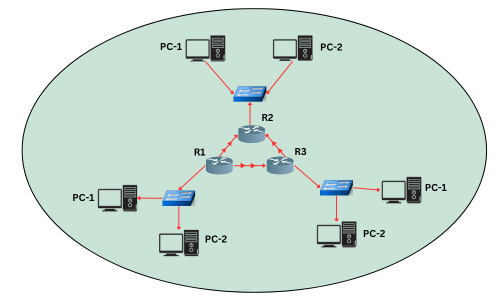
In a company, there are three different networks, each connected to three routers: R1, R2, and R3. These routers help the networks talk to each other and share data.
When R1 wants to send information to R2, they use a special set of rules called a protocol. This protocol helps them understand each other. The protocol used in this case is called an Interior Gateway Protocol (IGP).
IGPs help routers within the same company or organization communicate effectively. By using IGP, R1 can easily share data with R2 and R3, ensuring that all parts of the network work together smoothly. This is like having a common language that everyone in the company understands, allowing them to collaborate and share information quickly.

EGP (Exterior Gateway Protocols)
Exterior Gateway Protocols (EGPs) are used to share routing information between different networks, known as autonomous systems (ASes), on the Internet. An AS is a large network controlled by a single organization. EGPs help these networks communicate and find the best paths for data to travel.
When two networks in different locations need to communicate, we check which protocol they use. This communication is done using EGP. EGP manages how data is exchanged between networks that are not part of the same internal system. This is important when networks from different organizations or locations need to connect securely.
EGPs facilitate communication between networks in different areas or autonomous systems.
For example,
they ensure smooth communication between the New York and San Francisco branches of a company by managing how data is routed between them. This diagram shows how data moves from one network to another using the Internet. It helps people understand how different locations can talk to each other easily.
Why Use an Internet Service Provider (ISP)?
When setting up a network or internet connection, using an ISP can be very beneficial:
-
Technical Expertise:
ISPs have the skills and resources to manage connections, troubleshoot problems, and provide support, making the process smoother and more reliable.
-
Cost Efficiency:
Setting up your own network can be expensive due to equipment, maintenance, and ongoing costs. ISPs have the necessary infrastructure in place, which can save you money on initial investments.
-
Scalability:
ISPs can offer services that easily adjust to your needs, allowing you to change your bandwidth and services without a complete system overhaul.
In summary, using an ISP helps you reduce costs and simplify the management of your network infrastructure.
In EGP, there is one type of path vector routing protocol which includes three types:
| Exterior Gateway Protocol (EGP) | This is the basic protocol for exchanging routing information between different autonomous systems. |
|---|---|
| Border Gateway Protocol (BGP) | This is an advanced version of EGP and is currently the primary protocol used for Internet routing, offering more features and flexibility. |
| Inter Domain Routing Protocol (IDRP) | Released after BGP, this protocol is more complex and is not commonly used, with BGP being the preferred option. |
So What is BGP?
Border Gateway Protocol (BGP) is a system that helps decide the best path for data to travel on the internet, similar to how the postal service finds the fastest way to deliver mail. It links different networks, called autonomous systems (AS), by sharing route information. This allows data to flow smoothly between networks, making the internet work properly through a process called peering.
-
External BGP (eBGP):
This type of BGP is used to share routing information between routers that belong to different networks, usually between companies or internet service providers. eBGP makes sure data can travel across the internet by passing routing details between these networks.
-
Internal BGP (iBGP):
This type of BGP is used to share routing information within the same network. iBGP helps routers inside one network have the right information to send data to the correct destination.
Here’s an example of how BGP works:
Example 01:
In simple terms, you can split your internet traffic between two different ISPs using BGP. For example:
- You want 60% of your traffic to go through ISP1 and the remaining 40% through ISP2.
- By using BGP, you can set up rules that control how much traffic goes to each ISP.
- This way, your network can balance traffic between both ISPs, ensuring better load distribution and redundancy in case one ISP fails.
BGP is commonly used in scenarios where a business has multiple connections to the internet and wants to control how traffic is shared across these connections.
Example 02:
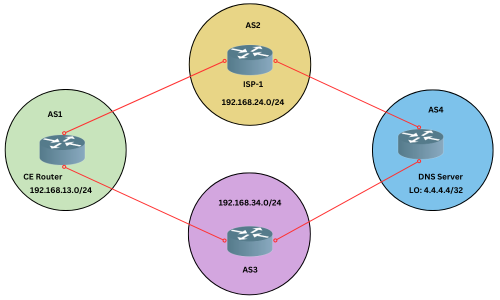
Imagine a business that has a router that connects to two different internet service providers (ISPs). The company needs to send traffic to a specific DNS server with the address 4.4.4.4 through one ISP (let's call it AS3). At the same time, they want all other network traffic to go through the second ISP, AS2.
In this case, they can use BGP (Border Gateway Protocol) to set rules for the router. BGP will tell the router, "Send traffic for the DNS server through AS3 and send everything else through AS2." This makes the network smart, so it knows exactly where to send the traffic, balancing the connections efficiently.
Example 03:
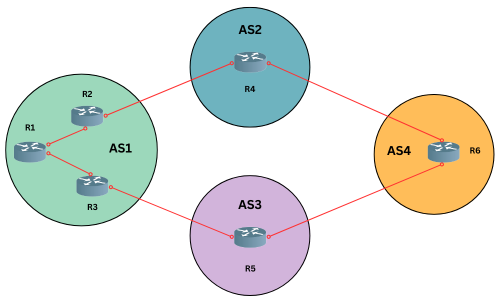
Imagine you have a network where AS1 is like a big office building with multiple exits. You want to make sure that all the traffic leaving this building goes through a specific exit, which is R3. This way, no matter which door or route is used inside the building, everything should end up going through this exit R3 before heading out to the outside world.
At the same time, there’s another route, R2, that also needs to be used for some traffic but should still leave the building through R2.
To make this happen, you can use BGP (Border Gateway Protocol). BGP is like a traffic manager that makes sure all the outgoing routes from AS1 are directed through R3, while still allowing certain traffic to exit through R2. This way, everything follows the right path as planned.
In summary, BGP (Border Gateway Protocol) is like a traffic manager for the Internet. It helps different networks talk to each other and decide the best path for data to travel. Just like a traffic controller at a busy intersection, BGP ensures that data finds the most efficient route to its destination. It helps keep the internet running smoothly by making sure that data takes the best path from one network to another.
By understanding and using BGP, network administrators can make sure their data travels quickly and reliably across the vast and complex web of the internet.